[JavaScript] typeof / instanceof, String 객체
2023. 2. 8. 05:33ㆍJavaScript
1. typeof, instanceof
- typeof : 피연산자의 데이터 타입을 반환하는 타입 연산자
- instanceof : 객체가 특정 객체 타입인지 확인하는 비교 연산자
<script>
    // String 객체를 생성하는 방법
    let str1 = "ABCDEFG";                       // 문자열 변수
    let str2 = new String("가나다라마바사");    // 문자열 객체

    // typeof 피연산자의 데이터 타입을 반환하는 타입 연산자
    console.log("===================> typeof");
    console.log(typeof str1);   // string
    console.log(typeof str2);   // object

    // instanceof - 객체가 특정 객체 타입이지 확인하는 비교 연산자
    console.log("===================> instanceof");
    console.log(str1 instanceof String);    // false --> String 객체가 아닌 변수
    console.log(str2 instanceof String);    // true  --> String 객체
</script>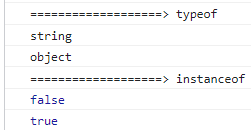
2. String 객체
let str = "가나다"; -> String 변수
let str = new String("가나다"); -> String 객체
3. String 객체 주요 메소드
| charAt(position) | str1.charAt(1); | 해당 인덱스 문자 반환 |
| charCodeAt(position) | str1.charCodeAt(1); | 해당 인덱스 문자를 유니코드로 반환 |
| concat(args) | str1.concat("1234"); | 매개변수로 입력한 문자열을 결합 |
| indexOf(search, position) | str1.indexOf("C"); | 앞에서부터 일치하는 문자열의 인덱스 반환 없으면 -1 반환 |
| lastIndexOf(search, position) | str1.lastIndexOf("c"); | 뒤에서부터 일치하는 문자열의 인덱스 반환 없으면 -1 반환 |
| match(regExp) | str1.match("BC"); | 문자열 안에 regExp가 있는지 확인 있으면 배열로 반환 없으면 null로 반환 이 때 boolean으로 형변환 해주면 true false로 반환 가능해진다. |
| replace(regExp, replace) | str1.replace("ABC", "가나다"); | 문자열 안에 regExp를 replace로 바꾼 뒤 리턴 |
| search(regExp) | str1.search("CD"); | regExp와 일치하는 문자열의 위치 반환 못찾으면 -1 반환 |
| slice(start, end) | str1.slice(1, 3); | 특정 위치의 문자열을 반환 endIndex는 포함하지 않음 |
| split(separator, limit) | str1.split(","); | seprator로 문자열 자른 후 배열로 반환 |
| substr(start, count) | str1.substr(2, 3); | start부터 count개 문자열을 잘라서 반환 |
| substring(start, end) | str1.substring(1, 3); | start부터 end까지 문자열을 잘라 반환 endIndex는 포함하지 않음 |
| toLowerCase() | str1.toLowerCase(); | 문자열을 소문자로 바꾸어 반환 |
| toUpperCase() | str1.toUpperCase(); | 문자열을 대문자로 바꾸어 반환 |
4. String 객체 예시
<script>
    // String 객체를 생성하는 방법
    let str1 = "ABCDEFG";                       // 문자열 변수
    let str2 = new String("가나다라마바사");    // 문자열 객체

    console.log(str1);
    console.log(str2);

    // charAt(position) - 해당 인덱스 문자 반환
    console.log("===================> charAt");
    console.log(str1.charAt(0));    // A
    console.log(str2.charAt(1));    // 나

    // charCodeAt(position) - 해당 인덱스 문자를 유니코드로 반환
    console.log("==================> charCodeAt");
    console.log(str1.charCodeAt(0));    // 65
    console.log(str2.charCodeAt(1));    // 45208

    // concat(agrs) - 매개변수로 입력한 문자열을 결합
    console.log("==================> concat");
    console.log(str1.concat("1234"));   // ABCDEFG1234
    console.log(str2.concat("!@#$"));   // 가나다라마바사!@#$

    // indexOf(searchString, position) - 앞에서부터 일치하는 문자열의 인덱스 반환
    console.log("=================> indexOf");
    console.log(str1.indexOf("C"));     // 2
    console.log(str2.indexOf("c"));     // -1(없다)

    // lastIndexOf(searchString, position) - 뒤에서부터 일치하는 문자열의 인덱스 반환
    console.log("=================> lastIndexOf");
    console.log(str1.lastIndexOf("C"));     // 2
    console.log(str2.lastIndexOf("c"));     // -1(없다)

    // match(regExp) - 문자열 안에 regExp가 있는지 확인
        // 있으면 배열로 반환 있으면 null
        // 이때 boolean으로 형변환 해주면 true false로 반환해준다.
    console.log("================> match");
    console.log(str1.match("BC"));      // ['BC']
    console.log(str2.match("가가"));    // null
    console.log(Boolean(str1.match("BC")));      // true
    console.log(Boolean(str2.match("가가")));    // false

    // replace(regExp, replcement) - 문자열 안에 regExp를 replacement로 바꾼 뒤 리턴
    console.log("================> replace")
    console.log(str1.replace("ABC","가나다"));  // 가나다DEFG
    console.log(str2.replace("가나다","12"));   // 12라마바사

    // search(regExp) - regExp와 일치하는 문자열의 위치 반환
    console.log("===============> search")
    console.log(str1.search("CD"));     // 2(찾으면 위치 반환)
    console.log(str2.search("213"));    // -1(못찾으면 -1)

    // slice(start, end) - 특정 위치의 문자열를 반환
        // endIndex는 포함하지 않는다.
    console.log("==============> slice");
    console.log(str1.slice(1, 3));   // BC
    console.log(str2.slice(0, 3));   // 가나다

    // substr(start, count) - start부터 count개 만큼 문자열을 잘라서 반환
    console.log("==============> substr")
    console.log(str1.substr(2, 3));  // CDE
    console.log(str2.substr(2, 1));  // 다

    // substring(start, end) - start부터 end 까지 문자열을 잘라서 반환
        // endIndex는 포함하지 않는다.
    console.log("===============> substring");
    console.log(str1.substring(1, 3));  // BC
    console.log(str2.substring(1, 2));  // 나

    // toLowerCase() - 문자열을 소문자로 바꾸어 반환
    console.log("===============> toLowerCase");
    console.log("ABCDE".toLowerCase());     // abcde
    console.log("AbCde".toLowerCase());     // abcde

    // toUpperCase() - 문자열을 대문자로 바꾸어 반환
    console.log("===============> toUpperCase");
    console.log("abcde".toUpperCase());     // ABCDE
    console.log("AbCDe".toUpperCase());     // ABCDE
</script>
'JavaScript' 카테고리의 다른 글
| [JavaScript] 문서 객체 모델(DOM) (0) | 2023.02.08 |
|---|---|
| [JavaScript] JavaScript Array 객체 (0) | 2023.02.08 |
| [JavaScript] JavaScript 내장 객체, Object 객체, Number 객체 (0) | 2023.02.08 |
| [JavaScript] JavaScript 객체 (0) | 2023.02.08 |
| [JavaScript] 변수의 종류(var, let, const) (0) | 2023.02.08 |